WordPress Admin Customization: Create a Better Client Experience with a Personalized Dashboard
Managing a website should be simple for clients, yet the default WordPress dashboard often feels overwhelming. Many users only need access to a few essential features, but WordPress displays dozens of menus, settings, and tools that can confuse non-technical users. This is where WordPress Admin Customization becomes invaluable.
By tailoring the WordPress backend, businesses, agencies, and developers can create a clean, branded, and intuitive experience that improves usability while reducing support requests. Whether you’re building websites for small businesses, eCommerce stores, or corporate organizations, customizing the admin dashboard enhances professionalism and empowers clients to manage their content confidently.
In this guide, we’ll explore the benefits of WordPress Admin Customization, practical customization techniques, and best practices for building a streamlined admin experience.
Why WordPress Admin Customization Matters
The standard WordPress dashboard is designed to accommodate every type of website. While this flexibility is powerful, it often introduces unnecessary complexity for clients.
A customized backend focuses only on the tools users actually need. This approach reduces distractions, minimizes accidental configuration changes, and creates a more enjoyable website management experience.
Benefits include:
- Easier navigation
- Improved client confidence
- Stronger brand consistency
- Reduced training requirements
- Lower maintenance support costs
For agencies managing multiple client websites, WordPress Admin Customization also creates a consistent workflow across projects.
Build a Professional White-Label WordPress Experience
One of the most valuable customization techniques is creating a White-label WordPress environment.
Instead of displaying WordPress branding throughout the admin panel, developers can replace it with their own company branding or the client’s business identity.
White-label customization can include:
- Custom login page
- Company logo
- Personalized dashboard widgets
- Custom admin colors
- Branded footer messages
- Customized welcome screen
This professional touch strengthens trust while delivering a premium user experience.
Design Client Dashboards That Focus on Essential Tasks
Most website owners only perform a handful of routine activities such as:
- Publishing blog posts
- Updating pages
- Uploading media
- Managing products
- Reviewing inquiries
Instead of exposing every WordPress feature, well-designed client dashboards prioritize these everyday tasks.
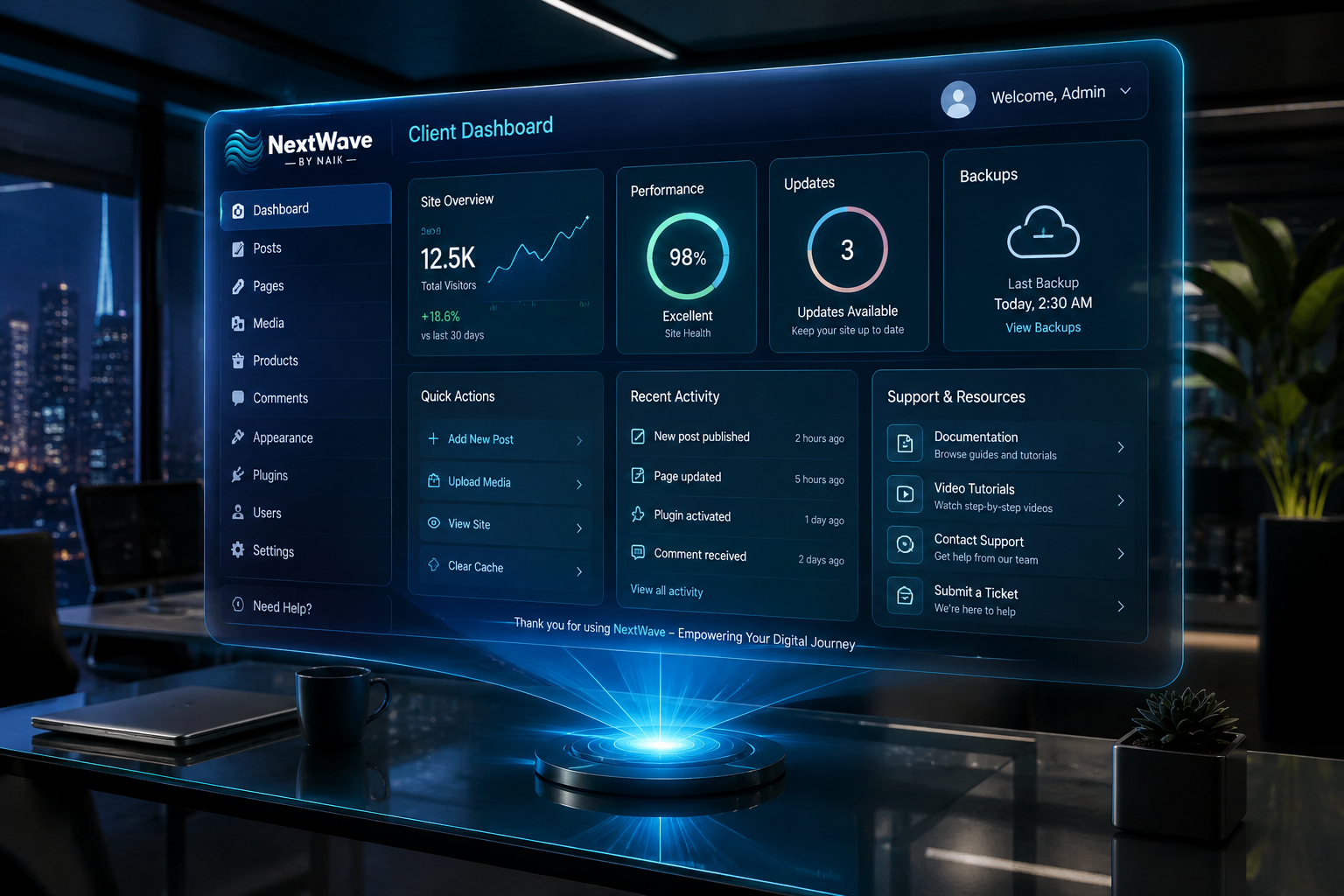
Effective dashboards often include:
- Quick content shortcuts
- Website performance summary
- Contact form notifications
- SEO reminders
- Backup status
- Important documentation links
When users immediately see the tools they need, productivity improves dramatically.
Simplify the Backend UI for Better Usability
An organized backend UI makes website management far less intimidating.
Removing unnecessary menu items helps clients stay focused while reducing the likelihood of accidental changes to important settings.
Common backend improvements include:
Hide Advanced Menus
Remove access to:
- Appearance
- Plugins
- Tools
- Settings
- Theme Editor
These areas are typically unnecessary for everyday users.
Reorder Navigation
Place frequently used menus at the top.
For example:
- Dashboard
- Posts
- Pages
- Media
- Products
- Contact Forms
This logical arrangement creates a smoother workflow.
Customize Admin Colors
Brand colors make the dashboard feel more personalized while improving visual consistency.
Personalize the Login Experience
The login page creates the first impression of your website’s management system.
Instead of the default WordPress screen, consider adding:
- Company logo
- Brand colors
- Custom background image
- Personalized login message
- Helpful support contact
A branded login page reinforces professionalism while making the platform feel like a custom-built solution.
Improve User Roles and Permissions
A critical component of WordPress Admin Customization is limiting access based on user responsibilities.
Examples include:
- Editors can manage content only.
- Shop managers handle WooCommerce products.
- Authors publish blog posts.
- Administrators manage website settings.
Proper permission management protects your website while simplifying the interface for each user.
Add Helpful Dashboard Widgets
The default WordPress dashboard contains widgets that many clients rarely use.
Replace them with useful custom widgets such as:
- Website analytics overview
- Monthly traffic reports
- Support contact information
- Video tutorials
- Frequently asked questions
- Maintenance announcements
Helpful widgets reduce confusion and give clients immediate access to important resources.
Customize the WordPress Toolbar
The top admin toolbar often contains links that clients never use.
Removing unnecessary options creates a cleaner workspace.
Useful toolbar additions include:
- Visit Website
- Add New Blog Post
- Open Support Portal
- Documentation Center
- Backup Status
Small improvements like these significantly enhance usability.
Automate Routine Administrative Tasks
Modern WordPress websites benefit from automation.
Customized admin experiences can integrate:
- Automatic backups
- Scheduled plugin updates
- Security monitoring
- Broken link detection
- SEO notifications
- Performance optimization alerts
Automation reduces manual work while improving website reliability.
Best Plugins for WordPress Admin Customization
Several plugins simplify backend personalization without requiring custom development.
Popular options include:
- Adminimize
- White Label CMS
- Ultimate Dashboard
- Admin Menu Editor
- User Role Editor
These tools allow developers to customize menus, permissions, branding, widgets, and dashboard layouts with minimal effort.
Best Practices for WordPress Admin Customization
To maximize effectiveness, follow these proven strategies:
- Keep the interface clean and uncluttered.
- Show only features users actually need.
- Maintain consistent branding throughout the dashboard.
- Test different user roles before launch.
- Provide quick access to documentation and support.
- Regularly review dashboard usability as the website grows.
A thoughtful customization strategy ensures clients enjoy a seamless experience without sacrificing functionality.
Future Trends in WordPress Admin Customization
The future of WordPress administration is becoming increasingly intelligent.
Emerging trends include:
- AI-powered content suggestions
- Personalized dashboard recommendations
- Predictive maintenance alerts
- Advanced workflow automation
- Voice-assisted website management
- Integrated performance monitoring
As WordPress evolves, customized dashboards will continue to deliver more efficient and user-friendly website management experiences.
Conclusion
A well-planned WordPress Admin Customization strategy transforms the default WordPress dashboard into an intuitive, branded, and client-focused workspace. From implementing White-label WordPress branding to designing streamlined client dashboards and optimizing the backend UI, every improvement contributes to a more professional and productive user experience.
Whether you’re a freelancer, agency, or business owner, investing in admin customization reduces support requests, enhances security, and gives clients the confidence to manage their websites independently. By combining thoughtful design, role-based permissions, and automation, you can create a WordPress backend that is both powerful and remarkably easy to use.