
Google Ads Search Terms: How to Find High-Intent Keywords Hidden Inside Your Campaigns
Running Google Ads is not only about selecting keywords and waiting for clicks.
One of the most valuable sources of campaign intelligence is already inside your account: Google Ads Search Terms.
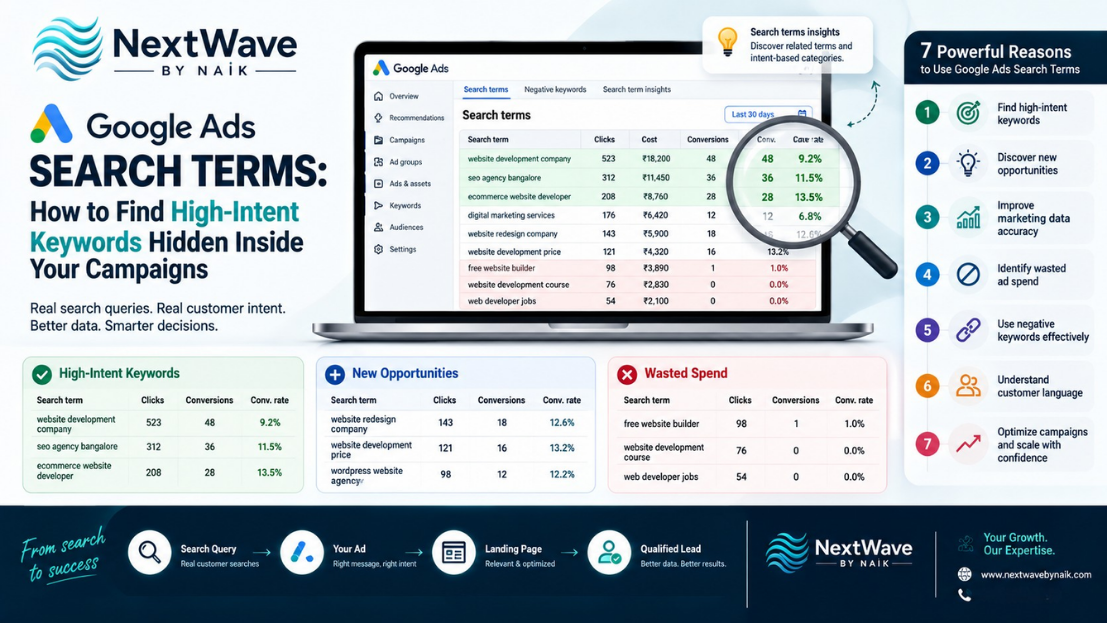
The search terms report shows the actual searches that triggered your ads and how those searches performed. Google also provides search terms insights, which group related search behaviour into intent-based categories and subcategories.
This means businesses can move beyond guessing what customers might search for and start analysing what people are actually typing before they click an ad.
A strong search term analysis can reveal:
- New high-intent keywords
- Irrelevant searches wasting budget
- Customer language you had not considered
- New ad-group opportunities
- Better landing-page ideas
- Negative keyword opportunities
- Differences between keyword intent and real search behaviour
Used correctly, Google Ads Search Terms can become one of the strongest tools for PPC keyword research and ongoing Google Ads optimization.
What Are Google Ads Search Terms?
Google Ads Search Terms are the actual searches people use that can cause your ads to appear.
They are different from the keywords you add to your campaign.
For example, you may target the keyword:
website development company
But actual customer searches may include:
- website development company in Bangalore
- ecommerce website development agency
- affordable website developer near me
- WordPress website development company
- business website developer
- custom website design company
Your keyword is what you target.
The search term is what the customer actually searched.
Google’s keyword match types determine how closely a search needs to relate to your keyword for an ad to be eligible, and close variants can allow keywords to match searches that are similar rather than identical.
This is exactly why analysing actual queries matters.
Why Search Term Analysis Is So Valuable
Traditional keyword research happens before the campaign starts.
You may use:
- Keyword Planner
- Competitor research
- Previous campaign data
- Customer interviews
- SEO keyword research
But once your campaign begins, Google Ads Search Terms provide real behavioural data.
Instead of asking:
“What do we think customers search for?”
you can ask:
“What are customers actually searching before interacting with our ads?”
That difference can significantly improve PPC keyword research.
9 Ways to Use Google Ads Search Terms More Effectively
1. Identify High-Intent Keywords
The first opportunity is to find searches that clearly show buying intent.
Compare:
digital marketing
with:
digital marketing agency Bangalore pricing
The second search shows stronger commercial intent.
Other high-intent modifiers can include:
- buy
- price
- cost
- quote
- company
- agency
- service
- near me
- book
- consultation
- supplier
- manufacturer
These are not automatically good keywords in every industry, but they can indicate that the searcher is closer to taking action.
During search term analysis, look for queries that combine:
Your service/product + commercial intent
For example:
- SEO agency pricing
- website development quotation
- salon near me open now
- drilling fluid supplier India
- digital marketing company Bangalore
These can become valuable high intent keywords.
2. Find New Keywords You Did Not Originally Target
A campaign may uncover valuable searches that were never included in your original keyword list.
For example, suppose you target:
website design services
but discover conversions from:
- website redesign company
- ecommerce website agency
- business website developer
- WordPress development services
These queries may deserve their own keywords, ad groups, or landing pages.
This is one of the strongest ways Google Ads Search Terms can support ongoing keyword expansion.
Instead of relying only on pre-campaign research, you are building your keyword strategy using actual customer behaviour.
3. Find Keywords That Generate Conversions, Not Just Clicks
High click volume does not automatically mean a keyword is valuable.
Consider:
Search Term A
500 clicks
2 leads
Search Term B
80 clicks
12 leads
Search Term A generates more traffic.
Search Term B may be much more commercially valuable.
When analysing Google Ads Search Terms, evaluate metrics such as:
- Clicks
- Cost
- Conversions
- Conversion rate
- Cost per conversion
- Conversion value
- Revenue or qualified lead quality
Google’s search terms insights can also surface aggregated performance metrics including clicks, impressions, CTR, conversions, conversion rate and conversion value for intent-based search categories.
This helps businesses identify which types of searches are generating meaningful results.
4. Find Search Terms Wasting Your Budget
Search term analysis is not only about discovering opportunities.
It is also about finding waste.
Suppose your company provides premium website development.
Your ads may occasionally appear for searches such as:
- free website builder
- website development course
- web developer jobs
- website templates free download
- how to learn web development
These searches may be relevant to the general subject but irrelevant to your commercial offer.
Every irrelevant click can consume budget without moving the user closer to becoming a customer.
This is where Google Ads optimization should focus on intent, not merely keyword similarity.
5. Use Negative Keywords Carefully
Negative keywords can prevent ads from serving for search queries that match terms you want to exclude.
For example, a web-development company might consider excluding clearly irrelevant intent such as:
- jobs
- course
- tutorial
- free
- salary
depending on the campaign and business model.
However, negatives should be used carefully.
Over-blocking can prevent your campaign from reaching valuable searches. Google specifically recommends using negative keywords conservatively in AI-driven campaign types such as Performance Max, primarily for completely irrelevant queries or essential brand-safety needs.
The goal should be:
Remove genuine waste without accidentally blocking valuable demand.
6. Discover Customer Language
Marketers often describe services differently from customers.
A company may call a service:
Conversion Optimization
while customers search:
- increase website enquiries
- improve website sales
- website not getting leads
- improve landing page conversion
The meaning is similar, but the language is different.
Google Ads Search Terms can reveal how real customers describe their problems.
This information can improve:
- Ad headlines
- Descriptions
- Landing-page copy
- Website headings
- FAQs
- Sales scripts
- Blog topics
This makes search-term data valuable beyond paid advertising.
7. Build Better Ad Groups Around Search Intent
Not every related keyword belongs in the same ad group.
Suppose a campaign contains searches around:
Website Development
- website development company
- corporate website developer
- WordPress website agency
E-Commerce
- ecommerce website developer
- online store development company
- Shopify website developer
Website Redesign
- website redesign agency
- redesign my business website
- old website redesign service
These groups have different intent.
Instead of showing everyone the same generic ad, separate them into more focused themes.
This can help create:
- More relevant ads
- More relevant landing pages
- Better message matching
- Stronger conversion journeys
Search terms insights can also group related searches into categories and subcategories based on intent, which can help advertisers understand which demand themes are driving performance.
8. Improve Landing Pages Using Search Terms
Suppose your campaign attracts many searches for:
website development cost Bangalore
but your landing page does not mention:
- Pricing
- Starting cost
- Quote process
- Packages
- Timeline
The ad may generate clicks, but the landing page does not fully answer the visitor’s intent.
Search terms can reveal what information should appear on the landing page.
For example:
Search:
“website development price”
Improve page with:
- Pricing section
- Package comparison
- Quote CTA
Search:
“website developer near me”
Improve page with:
- Location
- Service area
- Google reviews
- Contact information
Search:
“ecommerce website development”
Improve page with:
- E-commerce portfolio
- Payment integration
- Product-management features
- E-commerce CTA
This connects PPC keyword research directly to conversion optimization.
9. Use Search Terms to Create New Content
Search-query data can also reveal topics for:
- Blogs
- FAQs
- Reels
- Landing pages
- Service pages
- Comparison pages
- Sales materials
Imagine users frequently search:
Google Ads cost for small business
That search could become:
- Blog: “How Much Should a Small Business Spend on Google Ads?”
- Reel: “₹500 vs ₹2,000 Daily Google Ads Budget”
- FAQ: “What Is the Minimum Google Ads Budget?”
- Landing-page section explaining campaign budgets
One strong query can become multiple content opportunities.
How to Identify High-Intent Keywords
Not every search containing commercial words is automatically valuable.
Look at both language and performance.
A useful high-intent query usually demonstrates some combination of:
Service Intent
Example:
SEO services
Commercial Intent
Example:
SEO agency pricing
Location Intent
Example:
SEO agency Bangalore
Transactional Intent
Example:
hire SEO company
Urgency
Example:
website developer near me today
Specificity
Example:
B2B ecommerce website development company
The more specific and relevant the search, the easier it may be to understand what the user wants.
Search Terms vs Keywords: Why the Difference Matters
Consider this example.
Target Keyword
digital marketing agency
Search Terms
- best digital marketing agency Bangalore
- digital marketing agency fees
- digital marketing agency jobs
- how to start a digital marketing agency
- digital marketing course agency training
All searches contain similar language.
But the commercial intent is completely different.
The first two may represent prospective customers.
The others may represent:
- Job seekers
- Students
- Entrepreneurs researching the industry
This is why keyword targeting alone is not enough.
Google Ads Search Terms help you see the real intent behind your traffic.
Search Terms and Keyword Match Types
Keyword match types affect which searches may trigger your ads.
Google Ads currently uses broad, phrase and exact matching options, and keywords may also match close variants rather than only identical wording.
Because matching is increasingly intent-oriented, reviewing actual queries becomes even more important.
Instead of assuming your keyword controls every exact search variation, monitor the traffic the campaign is actually receiving.
Search Terms Report vs Search Terms Insights
These two features are related but useful for different analysis.
Search Terms Report
Useful when you want to inspect individual searches that triggered ads and analyse their performance. Google describes the report as a way to understand the searches that triggered your ads and how those searches performed.
Search Terms Insights
Useful for understanding larger demand themes.
Google groups related search terms into categories and subcategories based on intent and shows aggregated performance data. Search terms insights also account for terms that may not individually appear in the search terms report because of privacy-related reporting limitations.
Using both can provide:
Individual query insight + broader demand insight
A Practical Search Term Analysis Process
Businesses can follow this workflow regularly.
Step 1: Review Search Terms
Look at the actual queries generating traffic.
Step 2: Sort by Cost
Identify searches consuming significant budget.
Step 3: Review Conversions
Find terms generating enquiries or purchases.
Step 4: Identify High-Intent Terms
Look for commercially valuable language.
Step 5: Identify Irrelevant Terms
Find clearly unrelated intent.
Step 6: Create Keyword Opportunities
Promote strong queries into your keyword strategy where appropriate.
Step 7: Review Negative Opportunities
Exclude clearly irrelevant demand carefully.
Step 8: Improve Ad Messaging
Use real customer terminology.
Step 9: Improve Landing Pages
Match page content to actual user intent.
What Metrics Should You Review?
When analysing Google Ads Search Terms, avoid focusing on one metric.
Review:
- Impressions
- Clicks
- CTR
- Cost
- Conversions
- Conversion rate
- Cost per conversion
- Conversion value
- Revenue
- Qualified leads
For lead-generation businesses, also compare ad data against the CRM.
For example:
Search Term A
20 leads
2 qualified
Search Term B
10 leads
8 qualified
Search Term B may deserve more attention even though it generated fewer total enquiries.
Search Term Analysis for Lead Generation
Lead-generation companies should classify search terms based on intent.
High Intent
- digital marketing agency Bangalore
- SEO agency quote
- website development price
- Google Ads management company
Medium Intent
- digital marketing services
- website development
- Google Ads services
Informational
- how does Google Ads work
- learn digital marketing
- SEO tutorial
Different businesses may classify these differently.
The objective is to understand which types of queries eventually become qualified customers.
Search Term Analysis for E-Commerce
E-commerce advertisers may discover patterns around:
- Product type
- Brand
- Size
- Colour
- Material
- Use case
- Price
- Offers
- Delivery
For example:
running shoes
is broad.
But:
men’s black running shoes size 9
is much more specific.
Search-term data can help improve:
- Product feeds
- Product titles
- Shopping campaigns
- Search campaigns
- Landing pages
- Category pages
Common Google Ads Search Term Mistakes
Looking Only at Keywords
Keywords tell you what you targeted.
Search terms reveal what customers actually searched.
Adding Too Many Negative Keywords
Blocking too aggressively can reduce valuable traffic.
Ignoring High-Cost Queries
Large spending with weak results deserves investigation.
Judging Only by CTR
A search can generate clicks without generating customers.
Ignoring Lead Quality
For B2B and service companies, qualified leads matter more than raw form submissions.
Never Updating Landing Pages
Search data should influence landing-page content.
Reviewing Search Terms Too Rarely
Search behaviour evolves, so analysis should be ongoing.
How Often Should You Review Google Ads Search Terms?
There is no universal schedule.
New campaigns with limited data may need more frequent review.
Mature campaigns may benefit from structured weekly or biweekly analysis, depending on traffic and spend.
The objective is not to make changes every day.
It is to gather enough meaningful data to identify:
- Waste
- Opportunities
- Intent patterns
- Performance changes
Avoid reacting aggressively to a single click or isolated query without context.
Google Ads Search Terms Checklist
When reviewing your campaign, check whether:
- High-spend search terms are relevant
- High-converting queries are identified
- High-intent keywords are being captured
- Irrelevant searches are reviewed
- Negative keywords are used carefully
- Customer language is reflected in ads
- Search intent matches landing pages
- Strong queries inform new ad groups
- CRM lead quality is considered
- Search terms insights are reviewed
- Content opportunities are documented
- Search-term analysis is repeated regularly
Conclusion
Your original keyword list is only the beginning of Google Ads optimization.
Once campaigns start generating traffic, Google Ads Search Terms reveal how potential customers actually search.
They can uncover new high intent keywords, improve PPC keyword research, expose wasted spend, strengthen landing pages and provide better customer-language insights.
The strongest search term analysis does not simply ask:
Which queries received clicks?
It asks:
Which queries produced valuable business outcomes?
By connecting actual searches with conversions, lead quality and revenue, businesses can make smarter Google Ads optimization decisions.
Instead of continually guessing which keywords customers might use, learn from the search behaviour already happening inside your campaigns.
That is where some of your most valuable keyword opportunities may already be hiding.
Ready to turn blogging into a powerful SEO growth engine for your business?
At NextWave By Naik, we specialize in creating data-driven blogging strategies that improve rankings, attract organic traffic, and build long-term authority. From keyword research to content creation and optimization, we handle everything—so you can focus on growing your business.