
Automated Lead Routing: 9 Smart Ways to Send Every Enquiry to the Right Salesperson Instantly
Getting more enquiries is great. But what happens after someone submits a form, sends a WhatsApp message, or requests a quotation?
If the enquiry simply sits inside an inbox or reaches the wrong salesperson, the business can lose valuable opportunities before the first conversation even happens.
This is where Automated Lead Routing becomes important.
Instead of manually checking enquiries and deciding who should handle each one, businesses can create automated workflows that capture a lead, evaluate its information, assign it to the right salesperson, and immediately notify the responsible team member.
A typical workflow looks like this:
Website → CRM → Lead Rules → Salesperson → Instant Notification → Follow-Up
With the right lead distribution automation, businesses can reduce response delays, improve enquiry management, and create a more organized sales process.
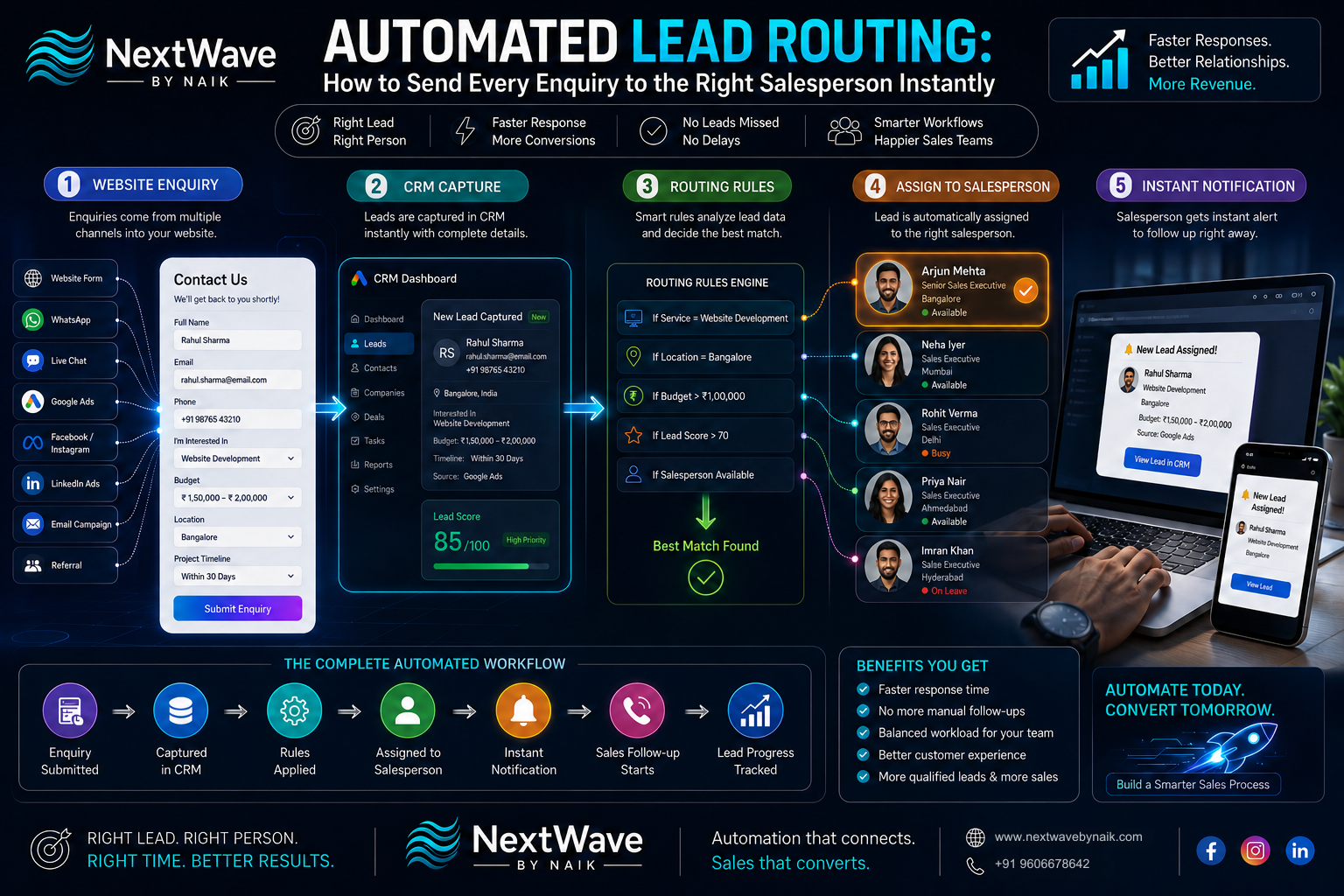
What Is Automated Lead Routing?
Automated Lead Routing is the process of automatically assigning incoming leads to the appropriate salesperson or sales team based on predefined rules.
These rules can consider factors such as:
- Location
- Product or service requested
- Lead source
- Industry
- Customer type
- Budget
- Language
- Sales territory
- Existing account ownership
- Lead priority
- Salesperson availability
For example, imagine a company receives enquiries for three different services:
- Website Development
- Digital Marketing
- Social Media Management
Instead of sending every enquiry to the same sales executive, automation can identify the requested service and route the enquiry accordingly.
The result is a faster and more relevant sales response.
Why Automated Lead Routing Matters
Imagine a potential customer submits a website enquiry at 10:15 AM.
Without automation:
10:15 AM: Enquiry submitted
11:00 AM: Someone notices it
11:30 AM: Team decides who should handle it
12:00 PM: Lead is forwarded
1:00 PM: Salesperson contacts the prospect
Several hours have passed.
With Automated Lead Routing:
10:15 AM: Enquiry submitted
↓
10:15 AM: CRM captures lead
↓
10:15 AM: Routing rules evaluate lead
↓
10:15 AM: Correct salesperson assigned
↓
10:15 AM: Salesperson receives notification
The difference is significant.
Fast routing does not guarantee a sale, but it can eliminate unnecessary administrative delays between enquiry and sales follow-up.
9 Smart Ways to Improve Automated Lead Routing
1. Route Leads Based on Service Requirements
One of the simplest routing rules is based on the service or product requested.
For example:
| Enquiry Type | Assigned Team |
|---|---|
| Website Development | Web Development Sales |
| SEO | Digital Marketing Sales |
| Social Media | Social Media Sales |
| Google Ads | Performance Marketing Sales |
| Branding | Creative Sales |
A website form can ask:
“What service are you interested in?”
The CRM can then use that answer to automatically assign the enquiry.
This eliminates the need for someone to manually sort incoming leads.
2. Route Leads by Location
Businesses operating across multiple cities or regions can use geographic routing.
For example:
- Bangalore → Bangalore Sales Team
- Mumbai → West Region Sales
- Delhi → North Region Sales
- Ahmedabad → Gujarat Sales
- International → International Sales
Location can be collected through:
- Form fields
- Phone numbers
- CRM data
- Customer profiles
- Campaign information
This type of CRM lead routing can be particularly useful for businesses with territory-based sales teams.
3. Use Lead Source to Assign the Right Team
Where a lead comes from can also determine who should handle it.
Potential sources include:
- Google Ads
- Organic search
- Website
- Referral
- Email campaigns
- Offline events
For example:
LinkedIn Lead → B2B Sales Team
Google Ads Lead → Performance Sales Team
Existing Customer Referral → Account Manager
This allows lead distribution automation to reflect the way your sales organization already operates.
4. Use Round-Robin Lead Distribution
What happens when several salespeople can handle the same type of enquiry?
A round-robin system can distribute leads sequentially.
For example:
Lead 1 → Salesperson A
Lead 2 → Salesperson B
Lead 3 → Salesperson C
Lead 4 → Salesperson A
The process continues automatically.
This can help prevent one salesperson from receiving nearly every new enquiry while others receive very few.
However, round-robin should be used only when salespeople have reasonably similar responsibilities and capacity.
5. Route High-Value Leads to Senior Salespeople
Not every enquiry has the same potential value.
A lead scoring system can work alongside Automated Lead Routing.
For example:
Low Priority
Budget: ₹10,000
→ Junior Sales Team
Medium Priority
Budget: ₹50,000
→ Standard Sales Team
High Priority
Budget: ₹5,00,000
→ Senior Account Executive
This creates a more intelligent sales workflow.
The CRM first evaluates the lead and then routes it according to its potential value.
6. Route Leads According to Industry
B2B businesses often serve multiple industries.
A salesperson specializing in healthcare may be better suited to a healthcare enquiry than someone who primarily handles e-commerce accounts.
For example:
Healthcare → Healthcare Specialist
Real Estate → Real Estate Sales
Manufacturing → Industrial Sales
E-commerce → E-commerce Specialist
Industry information can be collected through the enquiry form or enriched through CRM data.
This improves the relevance of the first sales conversation.
7. Consider Salesperson Availability
Routing a lead to the correct salesperson is useful.
Routing it to someone who is unavailable for several days is not.
A more advanced sales automation system can consider:
- Working hours
- Leave status
- Current workload
- Territory
- Assigned account
- Sales capacity
If the primary salesperson is unavailable, the workflow can assign the enquiry to a backup representative.
For example:
Primary Salesperson → Unavailable
↓
Backup Salesperson → Automatically Assigned
↓
Notification → Sent
This reduces the risk of leads sitting unattended.
8. Send Instant Notifications After Assignment
Assigning a lead is only half the workflow.
The salesperson also needs to know that a new opportunity has arrived.
Once the CRM assigns the enquiry, automation can trigger notifications through supported channels such as:
- CRM notification
- Microsoft Teams
- Slack
- SMS
- Mobile push notification
A notification could contain:
New Lead Assigned
Name: Rahul Sharma
Service: Website Development
Budget: ₹1,50,000
Source: Google Ads
Location: Bangalore
Phone: Available in CRM
This gives the salesperson enough context to prepare before contacting the prospect.
9. Create Automatic Follow-Up Workflows
Sometimes the salesperson does not respond immediately.
This is where the routing workflow can continue beyond assignment.
For example:
Lead Submitted
↓
CRM Creates Lead
↓
Lead Automatically Assigned
↓
Salesperson Notified
↓
Follow-Up Task Created
↓
No Response After 2 Hours
↓
Reminder Sent
↓
No Response After 24 Hours
↓
Manager Alert
This creates accountability without requiring a manager to manually monitor every enquiry.
The exact timing should depend on the business, sales cycle, lead volume, and customer expectations.
The Complete Website-to-Salesperson Workflow
A practical Automated Lead Routing system can look like this:
Step 1: Visitor Submits Website Form
The customer provides:
- Name
- Phone
- Company
- Service
- Budget
- Location
- Requirement
↓
Step 2: CRM Captures the Enquiry
The lead automatically enters the CRM.
↓
Step 3: Lead Data Is Evaluated
The system checks:
- Service
- Location
- Source
- Budget
- Industry
- Lead score
↓
Step 4: Routing Rule Is Applied
The CRM determines the appropriate salesperson.
↓
Step 5: Lead Is Assigned
The enquiry is added to the salesperson’s pipeline.
↓
Step 6: Salesperson Gets a Notification
The salesperson receives the lead information.
↓
Step 7: Follow-Up Task Is Created
The CRM records the required next action.
↓
Step 8: Management Can Track Progress
Managers can monitor:
- New leads
- Assigned leads
- Contacted leads
- Qualified leads
- Converted leads
- Unattended leads
This creates a complete enquiry management system.
Example: Automated Lead Routing for a Digital Agency
Consider a digital agency offering:
- Website Development
- SEO
- Google Ads
- Social Media Marketing
The enquiry form asks:
Which service are you interested in?
A visitor selects:
Google Ads Management
The workflow automatically identifies:
Service = Google Ads
Then:
Lead → Performance Marketing Salesperson
The CRM creates a task:
Contact new Google Ads enquiry.
The salesperson receives an instant notification.
The manager can then see:
Lead Status: New → Assigned → Contacted → Qualified → Proposal → Won/Lost
No one needs to manually forward the enquiry.
Automated Lead Routing vs Manual Lead Assignment
| Manual Lead Assignment | Automated Lead Routing |
|---|---|
| Leads manually checked | Leads automatically processed |
| Higher chance of delays | Faster assignment |
| Depends on staff availability | Rules operate automatically |
| Manual sorting required | CRM handles routing |
| Difficult to scale | Easier to scale |
| More administrative work | Less repetitive work |
| Greater chance of missed leads | Better visibility |
Automation does not eliminate the need for salespeople.
It eliminates unnecessary administrative work around them.
How to Build a Lead Routing Strategy
Before creating automation, define your routing rules.
Start by answering:
Who should receive each type of lead?
For example:
Service → Salesperson
Which locations belong to which team?
Location → Territory
Which leads are high priority?
Budget/Score → Senior Salesperson
What happens when someone is unavailable?
Availability → Backup Representative
What happens if a lead is not contacted?
No activity → Reminder/Manager Alert
These rules become the foundation of your automation.
Lead Routing Rules Should Be Simple at First
Businesses sometimes try to create dozens of complicated routing conditions immediately.
That can make the system difficult to manage.
Start with the most important rules:
- Service
- Location
- Lead source
- Lead score
- Salesperson availability
Once the workflow is stable, additional conditions can be introduced.
The goal is not to make automation complicated.
The goal is to make lead assignment reliable.
How Automated Lead Routing Improves Sales Response
A lead may lose interest when there is a long delay between enquiry and response.
Automated routing reduces the administrative steps between:
Customer Interest
and
Sales Contact
The process becomes:
Enquiry → Assignment → Notification → Follow-Up
instead of:
Enquiry → Inbox → Manual Review → Internal Message → Forwarding → Salesperson → Follow-Up
Reducing these steps can make the sales process more efficient.
Common Automated Lead Routing Mistakes
Routing Without Enough Data
If the form does not collect useful information, the CRM has fewer signals to make routing decisions.
Sending Everything to One Person
This creates bottlenecks and defeats the purpose of automation.
Ignoring Salesperson Availability
An assigned lead is not useful if nobody can handle it.
No Backup Routing
Always define what happens if the primary salesperson cannot respond.
No Notification
Assignment without notification can still result in delays.
No Follow-Up Tracking
Businesses should know whether assigned leads were actually contacted.
Overcomplicated Rules
Start with the rules that have the biggest operational impact.
Metrics to Track After Implementing Lead Routing
Once your workflow is running, monitor:
- Lead response time
- Lead assignment time
- Leads assigned per salesperson
- Uncontacted leads
- Qualified lead rate
- Conversion rate
- Salesperson performance
- Lead source performance
- Average time to first contact
- Lead-to-customer conversion
One particularly useful metric is:
Time to First Response
Compare your average response time before and after implementing automation.
If automation reduces the delay significantly, the routing system is creating operational value.
Automated Lead Routing and CRM Automation
CRM automation becomes much more powerful when routing is connected to other workflows.
For example:
Lead Captured
→ Create CRM record
→ Identify source
→ Calculate lead score
→ Assign salesperson
→ Send notification
→ Create follow-up task
→ Update pipeline
→ Send reminder if overdue
→ Alert manager if no action
This turns a CRM from a simple contact database into an active sales workflow system.
A Practical Automated Lead Routing Checklist
Before launching your system, make sure you have:
- A defined CRM
- Standardized enquiry fields
- Clear sales territories
- Service categories
- Lead sources
- Lead scoring rules
- Salesperson assignments
- Backup assignments
- Notification rules
- Follow-up tasks
- Escalation rules
- Reporting dashboards
Once these elements are defined, automation becomes much easier to implement and maintain.
Conclusion
Generating enquiries is only part of the sales process.
The next challenge is making sure every enquiry reaches the right person quickly.
Automated Lead Routing allows businesses to connect their website, CRM, routing rules, sales team, and notifications into one streamlined workflow.
Instead of manually checking forms and forwarding enquiries, businesses can automatically evaluate:
Who is the customer?
What do they need?
Where are they located?
How valuable is the opportunity?
Which salesperson should handle it?
The answer can then trigger an automatic assignment and instant notification.
When combined with lead distribution automation, CRM lead routing, and broader sales automation, this approach can reduce administrative delays and create a more consistent enquiry management process.
The ultimate goal is simple:
Every enquiry should reach the right salesperson, at the right time, with the right information.
Ready to turn blogging into a powerful SEO growth engine for your business?
At NextWave By Naik, we specialize in creating data-driven blogging strategies that improve rankings, attract organic traffic, and build long-term authority. From keyword research to content creation and optimization, we handle everything—so you can focus on growing your business.