
Add Your Heading TeInternal Site Search: Turning Website Search Data into Better Content and More Salesxt Here
When customers visit a website, they do not always follow the navigation exactly as planned. Some browse menus, some scroll through categories, and some go directly to the search bar.
That search bar can reveal something extremely valuable: what visitors actually want.
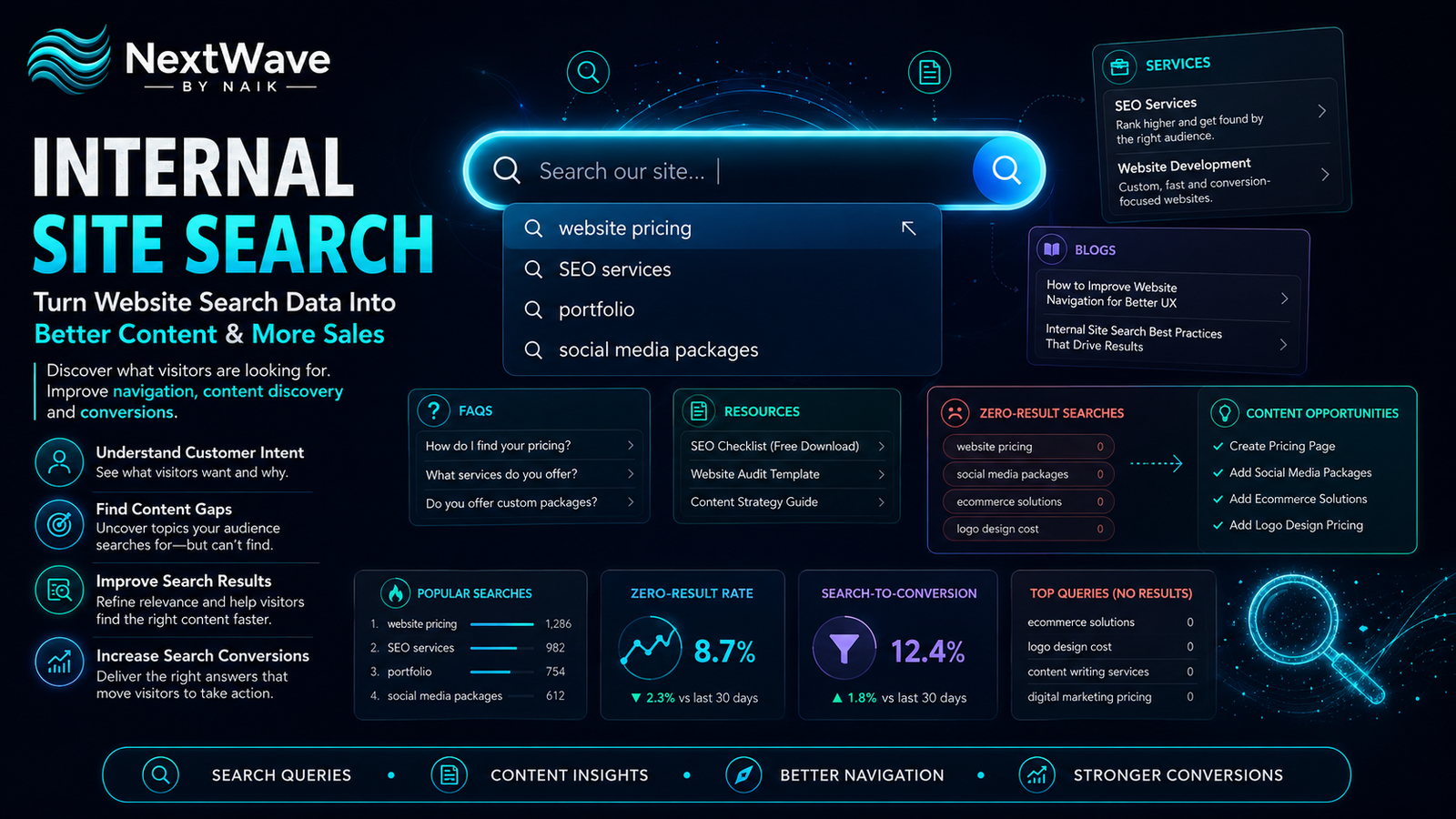
A strong Internal Site Search Optimization strategy helps businesses understand the exact words customers type inside their own website, what they are struggling to find, which products or services are in demand, and where the website experience may be creating friction.
Instead of treating internal search as just a convenience feature, businesses can use it as a source of customer-intent data.
By analysing website search analytics, studying on-site search behavior, and improving internal search conversion, businesses can make smarter decisions about content, navigation, product listings, and user experience.
What Is Internal Site Search Optimization?
Internal Site Search Optimization is the process of improving the search experience inside a website and using search data to understand customer needs.
Internal search may appear as:
- A search bar in the website header
- Product search on an e-commerce store
- Knowledge-base search
- Blog search
- Service search
- FAQ search
- Help-center search
The goal is not simply to show search results.
A good internal search system should help visitors find the right content quickly and help the business learn from every search query.
For example, if hundreds of people search for “same-day delivery” but the website does not have a page clearly explaining delivery options, that search data exposes a content gap.
Why Internal Search Data Matters
Most businesses spend a lot of time studying Google keywords, ad performance, social media engagement, and website traffic.
But the search terms entered directly into the website can be even more revealing because they come from visitors who are already interested enough to explore the site.
These visitors may be looking for:
- A specific product
- Pricing
- A service
- Delivery information
- A location
- A policy
- A comparison
- A product feature
- A downloadable resource
This is where website search analytics becomes valuable.
Internal searches can reveal:
- What customers want most
- Which information is hard to find
- Which products are gaining interest
- What terminology customers use
- Where navigation is weak
- Which pages should be created
- What content should be updated
How Internal Search Fits into the Customer Journey
Internal search often appears at the consideration or decision stage.
A visitor may:
- Discover the website through Google
- Read the homepage
- Use the search bar
- Search for “pricing”
- Visit the pricing page
- Read reviews
- Contact the business
That search action can be a strong intent signal.
The more specific the search, the stronger the likely intent.
For example:
“digital marketing” may indicate broad interest.
But:
“digital marketing package price”
suggests stronger commercial intent.
This is why on-site search behavior should be tracked alongside other website actions.
10 Ways Internal Site Search Optimization Can Improve Results
1. Identify What Customers Are Looking For
The first benefit of Internal Site Search Optimization is visibility into customer demand.
Track the most common searches.
Examples:
- service names
- product names
- pricing
- location
- offers
- delivery
- contact details
- specific features
If many people search for the same topic, that topic should probably be easier to find.
For example, if “pricing” is one of the top internal searches, pricing may not be visible enough in the website navigation.
2. Find Content Gaps
A search query with no useful result is a missed opportunity.
Suppose users frequently search for:
“SEO audit checklist”
but the website has no page covering it.
That tells the business there is demand for that content.
You can then create:
- A blog article
- A downloadable guide
- A service page
- An FAQ
- A landing page
Internal search data can become an ongoing source of content ideas.
3. Improve Website Navigation
If visitors constantly search for basic information, the website structure may be too confusing.
For example, if users repeatedly search for:
- contact
- services
- pricing
- location
- portfolio
these sections may need stronger visibility.
This does not mean internal search is failing.
It means website search analytics is exposing a navigation issue.
Improve:
- Main menus
- Footer links
- CTA placement
- Category pages
- Breadcrumbs
- Mobile menus
The goal is to make important information easy to reach both through browsing and search.
4. Improve Search Result Relevance
Search results should match customer intent.
A visitor searching for:
“website development”
should not see unrelated blog posts above the main service page.
Good search ranking should prioritize:
- Relevant service pages
- Product pages
- High-value content
- Current information
- Popular results
Search relevance directly affects internal search conversion.
If users get irrelevant results, they are more likely to leave.
5. Handle Misspellings and Search Variations
Real users do not always type perfectly.
They may search:
“web devlopment”
instead of:
“website development”
or:
“whatsapp automtion”
instead of:
“WhatsApp automation”
A strong Internal Site Search Optimization system should handle:
- Misspellings
- Singular/plural differences
- Abbreviations
- Common synonyms
- Product aliases
- Brand variations
This makes search more forgiving and user-friendly.
6. Use Autocomplete Suggestions
Autocomplete can help users search faster.
As the visitor types, the website can suggest:
- Products
- Services
- Categories
- Popular searches
- Blog topics
For example, typing:
“SEO”
could show:
- SEO Services
- Local SEO
- SEO Audit
- SEO Blog
- Website SEO Guide
Autocomplete reduces effort and guides users toward relevant results.
It also makes the website feel faster and more intelligent.
7. Prioritize High-Intent Search Queries
Not all searches have the same value.
Some indicate general browsing.
Others indicate purchase intent.
Examples of high-intent searches:
- price
- buy
- book
- package
- quote
- near me
- available
- consultation
- demo
- contact
These searches should be tracked closely.
Visitors using these terms may be closer to conversion and should see strong CTAs.
This is where on-site search behavior can support sales strategy.
8. Improve Product Discovery
For e-commerce businesses, internal search is essential.
Customers may search by:
- Product name
- Brand
- Category
- Color
- Size
- Material
- Price
- Use case
A weak search system can hide products even when they are available.
A strong one should support:
- Filters
- Sorting
- Synonyms
- Product suggestions
- Popular results
- Related products
Improved search visibility can support better internal search conversion.
9. Improve Zero-Result Searches
A zero-result page should never be a dead end.
Instead of:
“No results found”
show:
- Suggested searches
- Related categories
- Popular products
- Related blog posts
- Contact support
- WhatsApp assistance
For example:
“We couldn’t find an exact match. Try these related services.”
This keeps the visitor inside the website.
10. Connect Search Data with Conversion Data
The most useful question is not:
“What do people search?”
It is:
“Which searches lead to conversions?”
For example:
Users searching “website pricing” may convert at 8%.
Users searching “about us” may convert at 1%.
That difference matters.
Track:
- Search term
- Search result clicked
- Pages viewed after search
- CTA clicks
- Form submissions
- Purchases
- WhatsApp clicks
- Time to conversion
This connects website search analytics with actual business results.
Important Internal Search Metrics to Track
Search Usage Rate
What percentage of visitors use the search feature?
Most Popular Queries
Which search terms appear most often?
Zero-Result Rate
How often does the search return nothing useful?
Search Exit Rate
How often do users leave after searching?
Search Refinement Rate
How often do users change the search term?
Result Click-Through Rate
Do visitors click the results shown?
Search-to-Conversion Rate
How many users convert after using internal search?
Revenue from Search Users
For e-commerce, compare revenue from search users vs non-search users.
These metrics help evaluate Internal Site Search Optimization properly.
Internal Search Optimization for E-Commerce
E-commerce sites benefit heavily from strong search.
Customers often know what they want.
They may type:
- black formal shoes
- red dress size M
- wireless headphones
- perfume under ₹999
Good search should immediately guide them toward relevant products.
Improve e-commerce search using:
- Filters
- Faceted navigation
- Price ranges
- Color filters
- Category suggestions
- Brand suggestions
- Product availability
- Sorting options
- Popular searches
The faster a shopper finds the product, the lower the friction.
Internal Search Optimization for Service Businesses
Service-based websites may not have thousands of products, but internal search can still be valuable.
Users may search:
- pricing
- website development
- SEO
- social media
- location
- testimonials
- contact
- portfolio
- packages
These searches can reveal what potential leads care about most.
For example, if “pricing” is the top query, businesses may need:
- Clearer price ranges
- Better package descriptions
- FAQ answers
- Stronger pricing CTA
Use Search Terms to Improve SEO Content
Internal search can also support external SEO.
Suppose users repeatedly search:
“how much does a website cost in Bangalore”
That phrase may deserve:
- A blog article
- An FAQ
- A pricing guide
- A landing page
Internal search gives businesses language taken directly from customers.
This can help create content around real needs rather than assumptions.
Use Search Data for Social Media Content
Search data can also support content planning.
If users keep searching:
“Google ads cost”
that could become:
- A Reel
- A carousel
- A blog
- A FAQ
- A sales script
One search term can produce multiple content formats.
This turns internal search into a content-research tool.
Use Search Data for Sales Teams
Sales teams can benefit from knowing what website visitors search for.
If leads commonly search:
- price
- packages
- case studies
- results
- guarantee
- timeline
sales teams can prepare stronger responses around those topics.
This improves alignment between customer needs and sales conversations.
Common Internal Search Mistakes
Hiding the Search Bar
Users should not struggle to find it.
Returning Irrelevant Results
Search relevance matters more than quantity.
Ignoring Misspellings
Search should understand common typing errors.
Not Tracking Search Terms
Without tracking, the business loses valuable customer data.
Showing Empty Zero-Result Pages
Always offer alternatives.
Ignoring Mobile Search
Search should work smoothly on smaller screens.
Not Connecting Search to Conversion Data
Search usage alone does not show business impact.
Internal Site Search Optimization Checklist
Before improving your site search, check that:
- Search is easy to find
- Search works on mobile
- Common misspellings are supported
- Autocomplete is available
- Relevant results rank first
- Zero-result searches are monitored
- Related content is suggested
- Product filters are available
- High-intent searches are tracked
- Search queries are connected to conversion data
- Search terms are reviewed regularly
- Content gaps are identified from search data
How Often Should You Review Internal Search Data?
Reviewing search data should become a recurring website task.
A simple monthly process can include:
- Export top search terms
- Identify zero-result searches
- Review searches with high exits
- Compare search terms with conversions
- Identify missing content
- Improve search relevance
- Update navigation if needed
This makes Internal Site Search Optimization an ongoing improvement system instead of a one-time website feature.
Conclusion
A website search bar can reveal far more than what visitors type.
It can show what customers want, what they cannot find, what they are considering, and what may be blocking them from converting.
Internal Site Search Optimization turns those searches into useful business intelligence.
By studying website search analytics, understanding on-site search behavior, and improving internal search conversion, businesses can strengthen navigation, create better content, improve product discovery, and guide visitors toward the right next step.
The most valuable search data is not always coming from Google.
Sometimes, the clearest customer intent is already sitting inside your own website.
Ready to turn blogging into a powerful SEO growth engine for your business?
At NextWave By Naik, we specialize in creating data-driven blogging strategies that improve rankings, attract organic traffic, and build long-term authority. From keyword research to content creation and optimization, we handle everything—so you can focus on growing your business.