
Visual Search Readiness: Optimizing Product Images for Discovery and Shopping
Online shoppers do not always begin with words. Increasingly, they start with an image.
A customer may photograph a handbag, upload a screenshot of a lamp, scan a product in a store, or tap an image they like to find similar items online. Search engines and shopping platforms then analyse the visual details and display related products, prices, brands, and purchase options.
This shift makes Visual Search Optimization increasingly important for e-commerce businesses.
A product image should do more than look attractive. It should help search engines understand the item, match it with relevant shopping searches, and present it clearly enough for customers to compare and buy.
A strong visual-search strategy combines high-quality photography, accurate image files, descriptive metadata, structured product information, mobile performance, and consistent product presentation. Together, these elements improve image SEO for e-commerce, strengthen visual product discovery, and support better shopping search visibility.
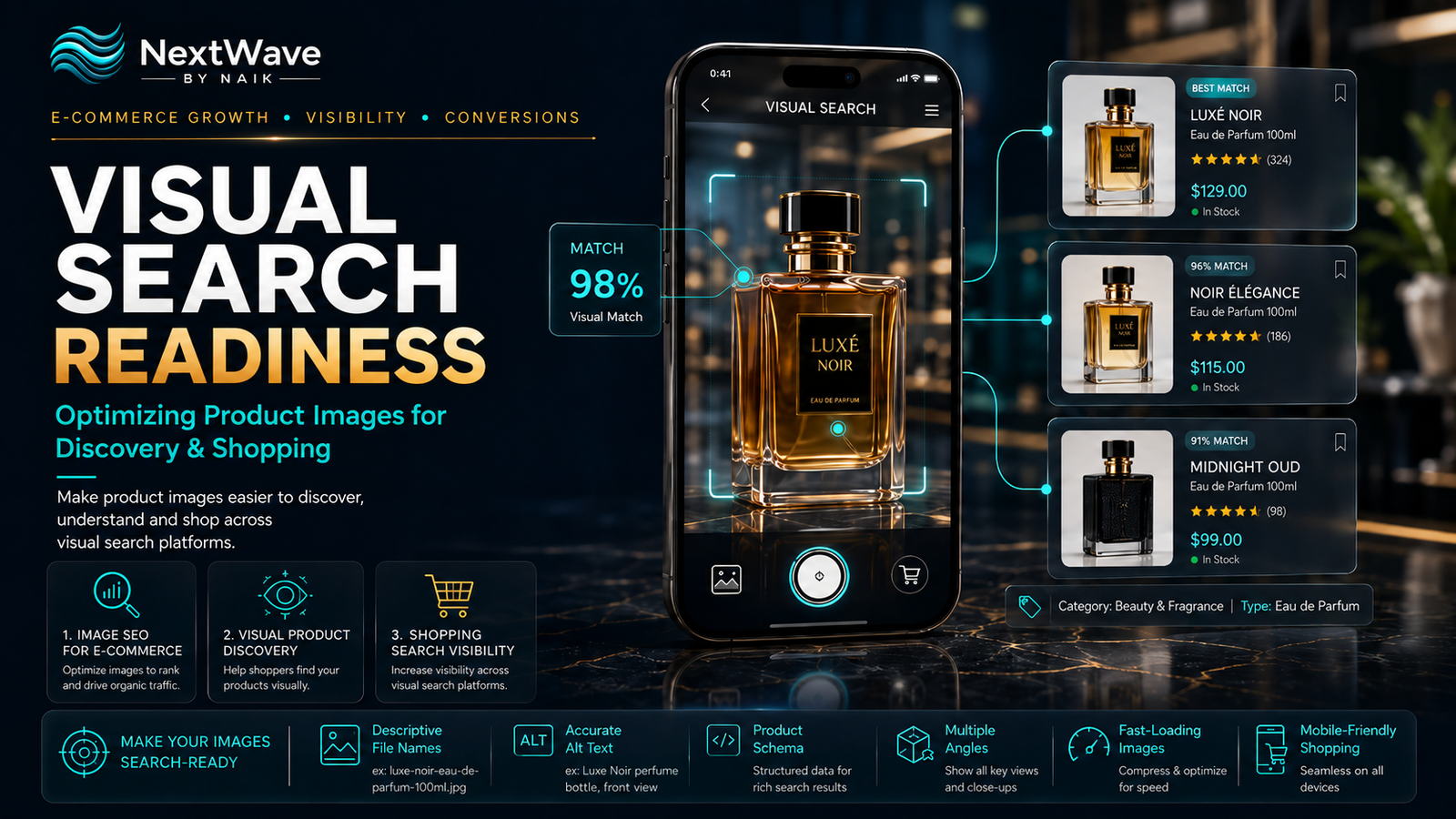
What Is Visual Search Optimization?
Visual Search Optimization is the process of preparing product images and surrounding product information so search engines, marketplaces, and shopping platforms can identify, understand, and recommend the products shown.
Traditional search depends heavily on written keywords. Visual search analyses details inside an image, such as:
- Shape
- Colour
- Material
- Pattern
- Product category
- Brand markings
- Packaging
- Texture
- Style
- Similar visual features
For example, a customer may upload a photo of a navy-blue perfume bottle with gold detailing. A visual search engine may then display similar bottles, related fragrances, matching packaging styles, and stores selling comparable products.
The clearer and more accurate the product imagery is, the easier it becomes for visual systems to understand and match the item.
Why Visual Search Matters for E-Commerce
Visual search reduces the effort required to describe a product.
A customer may not know the exact name of a fabric, furniture style, cosmetic shade, or product category. However, they may still know what they want when they see it.
This is especially useful for industries such as:
- Fashion
- Beauty
- Furniture
- Home décor
- Jewellery
- Footwear
- Electronics
- Food packaging
- Gifts
- Luxury products
- Automotive accessories
For these categories, product appearance strongly influences buying decisions.
Effective Visual Search Optimization can help products appear when shoppers:
- Upload a product photo
- Scan an item using a phone camera
- Search through image results
- Browse visually similar products
- Tap a product inside social content
- Use shopping-platform image search
- Explore related product recommendations
This creates new discovery opportunities beyond traditional text-based search.
How Visual Search Engines Understand Product Images
Visual search platforms usually evaluate both the image itself and the information connected to it.
Important signals may include:
- Image quality
- Product visibility
- File name
- Alt text
- Page title
- Product description
- Product category
- Structured data
- Price
- Availability
- Brand
- Colour
- Size
- Product identifiers
- Customer engagement
- Page relevance
This means a beautiful product image alone may not be enough.
For stronger shopping search visibility, the visual content and written product data should describe the same item consistently.
For example, if the image shows a red leather handbag, the file name, alt text, product title, description, product feed, and structured data should all support that same identification.
Practical Visual Search Optimization Checklist
1. Use Clear, High-Quality Product Images
The product should be easy to recognise.
Avoid:
- Blurry images
- Heavy filters
- Poor lighting
- Excessive shadows
- Distracting backgrounds
- Low-resolution uploads
- Cropped product edges
- Overly artistic angles that hide important details
The main product image should clearly show the complete item.
For e-commerce listings, include a clean front-facing image before adding more creative lifestyle photographs.
High-quality images support both customer confidence and machine recognition.
2. Keep the Product as the Main Focus
The product should occupy a meaningful portion of the image.
If the item appears too small inside a large decorative scene, visual systems may struggle to identify it accurately.
For the main product image:
- Centre the product
- Use a clean background
- Maintain clear separation from other objects
- Avoid unnecessary props
- Keep the outline visible
- Show the full product whenever possible
Lifestyle images are valuable, but they should support—not replace—clear product photography.
3. Provide Multiple Product Angles
A single image may not show enough detail.
Include photographs such as:
- Front view
- Side view
- Back view
- Top view
- Close-up
- Packaging view
- Scale reference
- Product-in-use image
- Texture detail
- Colour variation
Multiple angles improve visual product discovery because they give search systems more information about the product’s structure and appearance.
They also reduce customer uncertainty.
4. Use Descriptive Image File Names
Many businesses upload images with names such as:
IMG_4589.jpg
or:
product-final-new-2.png
These names provide little useful context.
Use clear, keyword-relevant file names instead.
Examples:
black-leather-office-handbag.jpg
rose-gold-womens-watch.jpg
kesar-chandan-camphor-spray.jpg
premium-wooden-dining-chair.jpg
Keep file names:
- Short
- Descriptive
- Lowercase
- Hyphen-separated
- Relevant to the actual product
A descriptive file name supports better image SEO for e-commerce and makes media libraries easier to manage.
5. Write Accurate Image Alt Text
Alt text explains the image to search engines and users who cannot view it.
Good alt text should describe the product clearly.
Weak alt text:
Product image
Better alt text:
Black leather office handbag with gold zip and structured handles
Avoid stuffing multiple unrelated keywords into the alt text.
The goal is accuracy, not repetition.
For product variations, change the alt text to reflect the actual image.
For example:
- Blue cotton men’s casual shirt, front view
- Blue cotton men’s casual shirt, collar detail
- Blue cotton men’s casual shirt worn with beige trousers
6. Match the Image With the Product Title
The product image and product title should describe the same item clearly.
A strong title may include:
- Product type
- Brand
- Colour
- Material
- Model
- Size
- Key feature
Example:
Premium Black Leather Laptop Bag for Men – 15.6 Inch
This gives both shoppers and search systems clear information.
Avoid overly creative titles that hide the product identity.
For example:
The Executive Essential
This may work as a campaign line, but it should not replace the descriptive product title.
7. Add Detailed Product Descriptions
The product description provides context that the image cannot communicate alone.
Include details such as:
- Material
- Colour
- Dimensions
- Weight
- Product function
- Style
- Compatibility
- Care instructions
- Package contents
- Ideal use
- Unique features
A detailed description strengthens the relationship between the visual and written content.
This supports Visual Search Optimization by helping platforms confirm what the image represents.
8. Use Consistent Product Attributes
Product attributes should remain consistent across:
- Product page
- Image alt text
- Product feed
- Marketplace listing
- Structured data
- Social shopping catalogue
- Advertisement
- Inventory system
For example, do not describe the same colour as:
- Burgundy
- Dark red
- Wine
- Maroon
across different platforms unless those terms are intentionally included together.
Inconsistent naming can create confusion and weaken product matching.
Choose standard terms for colours, materials, sizes, and categories.
9. Add Product Structured Data
Structured data helps search engines understand important product details.
Useful product information includes:
- Product name
- Image
- Price
- Currency
- Availability
- Brand
- SKU
- Rating
- Review count
- Product condition
- Offer details
Correct Product schema can support enhanced search results and improve the clarity of your product pages.
Structured data should match the visible information on the page.
Do not show one price to users and another price inside the markup.
10. Optimise Product Feeds
For shopping platforms and merchant listings, the product feed should be complete and accurate.
Important product-feed fields may include:
- Product title
- Product description
- Image link
- Additional image links
- Price
- Availability
- Brand
- Product identifier
- Condition
- Colour
- Size
- Material
- Product category
A well-maintained product feed supports stronger shopping search visibility because platforms can match products more accurately with user searches.
Update the feed whenever price, stock, product details, or images change.
11. Compress Images Without Losing Quality
Large image files can slow down product pages.
Slow pages create friction, especially for mobile shoppers.
Use:
- WebP or AVIF formats where supported
- Proper image dimensions
- Responsive images
- Compression
- Lazy loading
- Content delivery networks
- Thumbnail sizes for product grids
Do not upload a 5000-pixel image when the website displays it at 800 pixels.
The goal is to maintain visual quality while reducing unnecessary file weight.
Fast-loading images improve user experience and support better e-commerce performance.
12. Design for Mobile Visual Search
Many visual-search journeys begin on smartphones.
A user may take a photo, upload a screenshot, or browse shopping results directly from a mobile device.
Check that:
- Images load quickly
- Product details remain readable
- Zoom works properly
- Buttons are easy to tap
- Image galleries swipe smoothly
- Product information appears without excessive scrolling
- Checkout is mobile friendly
- Similar products are easy to browse
Strong mobile usability helps turn visual product discovery into actual purchases.
13. Use Realistic Colours
Colour is often an important visual-search signal.
The product colour shown in the image should match the actual item.
Avoid editing that changes:
- Skin-tone products
- Fabric shades
- Cosmetic colours
- Jewellery finishes
- Wood tones
- Packaging colours
- Product texture
Customers may return products if the real colour looks significantly different from the online image.
Accurate colour representation improves trust and product matching.
14. Avoid Text-Heavy Main Images
Promotional text can make product images harder to analyse.
The main product image should usually avoid:
- Large discount badges
- Long feature lists
- Watermarks
- Contact details
- Decorative typography
- Multiple products layered together
Promotional graphics can be included as secondary images.
Keep the primary product image clean and product-focused.
15. Show Product Scale
Some products are difficult to understand without a size reference.
You can show scale through:
- A hand holding the product
- A person wearing the item
- A product beside a familiar object
- Dimension graphics
- Room-context images
- Packaging size comparison
This is useful for:
- Bags
- Jewellery
- Furniture
- Cosmetics
- Electronics
- Storage products
- Home décor
Scale images help customers understand the product and reduce return risk.
16. Maintain Consistent Image Style
A consistent visual style makes a catalogue look more professional.
Use similar:
- Backgrounds
- Lighting
- Cropping
- Camera angles
- Image ratios
- Shadow styles
- Colour treatment
- Product spacing
Consistency supports stronger brand presentation and makes product comparisons easier.
For category pages, inconsistent image styles can make the shopping experience feel disorganised.
17. Add Customer and Lifestyle Images
Clean product photography supports identification. Lifestyle content supports imagination and trust.
Useful supporting visuals include:
- Customer photos
- Product-in-use images
- Room setups
- Styling examples
- Before-and-after images
- Unboxing content
- Packaging photographs
These images help shoppers understand how the product looks in a realistic setting.
However, always ensure you have permission to use customer-submitted content.
18. Connect Product Images to Relevant Pages
Do not upload product images without a useful destination.
Each image should connect to a relevant:
- Product page
- Category page
- Shopping listing
- Product collection
- Blog article
- Lookbook
- Buying guide
The destination page should include accurate pricing, availability, product details, and a clear buying action.
A visual-search result is only valuable if it leads shoppers to a helpful page.
19. Keep Prices and Stock Updated
A customer may discover a product through image search and click through expecting to buy it.
Outdated information creates frustration.
Keep the following accurate:
- Price
- Discount
- Stock status
- Product variation
- Delivery information
- Product image
- Availability date
If an item is unavailable, provide:
- Similar products
- Restock notification
- Alternative colour
- Related category
- Expected availability
This helps preserve the shopping journey.
20. Track Visual-Search Performance
Visual-search performance should be monitored like any other marketing channel.
Track:
- Image-search impressions
- Image-search clicks
- Product-page visits
- Shopping listing clicks
- Add-to-cart rate
- Conversion rate
- Product-image engagement
- Mobile performance
- Best-performing images
- Traffic by image landing page
- Product-feed errors
If one image receives more clicks than another, study its:
- Angle
- Background
- Product size
- Lighting
- Thumbnail clarity
- Colour contrast
These insights can improve future product photography.
Common Visual Search Optimization Mistakes
Using Low-Quality Images
Poor-quality images weaken recognition and customer confidence.
Uploading Generic File Names
File names should describe the product accurately.
Repeating the Same Alt Text
Each product image should reflect the view or detail being shown.
Hiding the Product Behind Props
The product must remain the main visual focus.
Ignoring Mobile Speed
Large images can create slow and frustrating shopping experiences.
Using Inconsistent Product Data
Titles, descriptions, colours, and product attributes should match across channels.
Showing Outdated Products
Images should lead to current and available listings.
Overediting Product Colours
The image should accurately represent the real item.
Visual Search Optimization Checklist
Before publishing a product image, confirm that:
- The product is clearly visible
- The image is high resolution
- The background is not distracting
- Multiple angles are available
- The file name is descriptive
- Alt text is accurate
- The product title is clear
- Product attributes are consistent
- Structured data is complete
- Product feeds are updated
- Images are compressed
- The page works well on mobile
- Colours are realistic
- The main image is not text-heavy
- Product scale is clear
- Lifestyle images are included where useful
- Price and stock are accurate
- The image links to the correct product page
- Performance tracking is active
Conclusion
Product images are no longer only design elements. They are part of the search and shopping experience.
Effective Visual Search Optimization helps search engines and shopping platforms understand product images, connect them with relevant searches, and present them to people who are ready to explore or buy.
Strong image SEO for e-commerce requires more than adding alt text. It involves clear photography, descriptive files, accurate product data, structured information, fast page performance, and consistent product presentation.
When businesses improve visual product discovery, they make it easier for customers to find items even when they do not know the exact product name.
A visually prepared catalogue can strengthen shopping search visibility, improve product confidence, and turn more image-based searches into meaningful website visits and sales.
Ready to turn blogging into a powerful SEO growth engine for your business?
At NextWave By Naik, we specialize in creating data-driven blogging strategies that improve rankings, attract organic traffic, and build long-term authority. From keyword research to content creation and optimization, we handle everything—so you can focus on growing your business.